Shopify
AR Try-On
2D-to-3D

Adding Gen AI clothing try-on to an e-commerce store is no longer a research project — it is an integration decision. The technology has matured. The models produce garment-level accuracy. The infrastructure can handle production traffic. The question is not whether to add virtual try-on. It is how to integrate it without disrupting what already works.
Most fashion brands evaluating gen AI virtual try-on API solutions for apparel hit the same fork: do you embed a ready-made try-on experience, or build your own UI on top of a headless API? Both paths work. They solve different problems and suit different team structures. This guide walks through each path using WEARFITS as the reference implementation — what the architecture looks like, what you need from your engineering team, and how to decide which approach fits your stack and timeline.
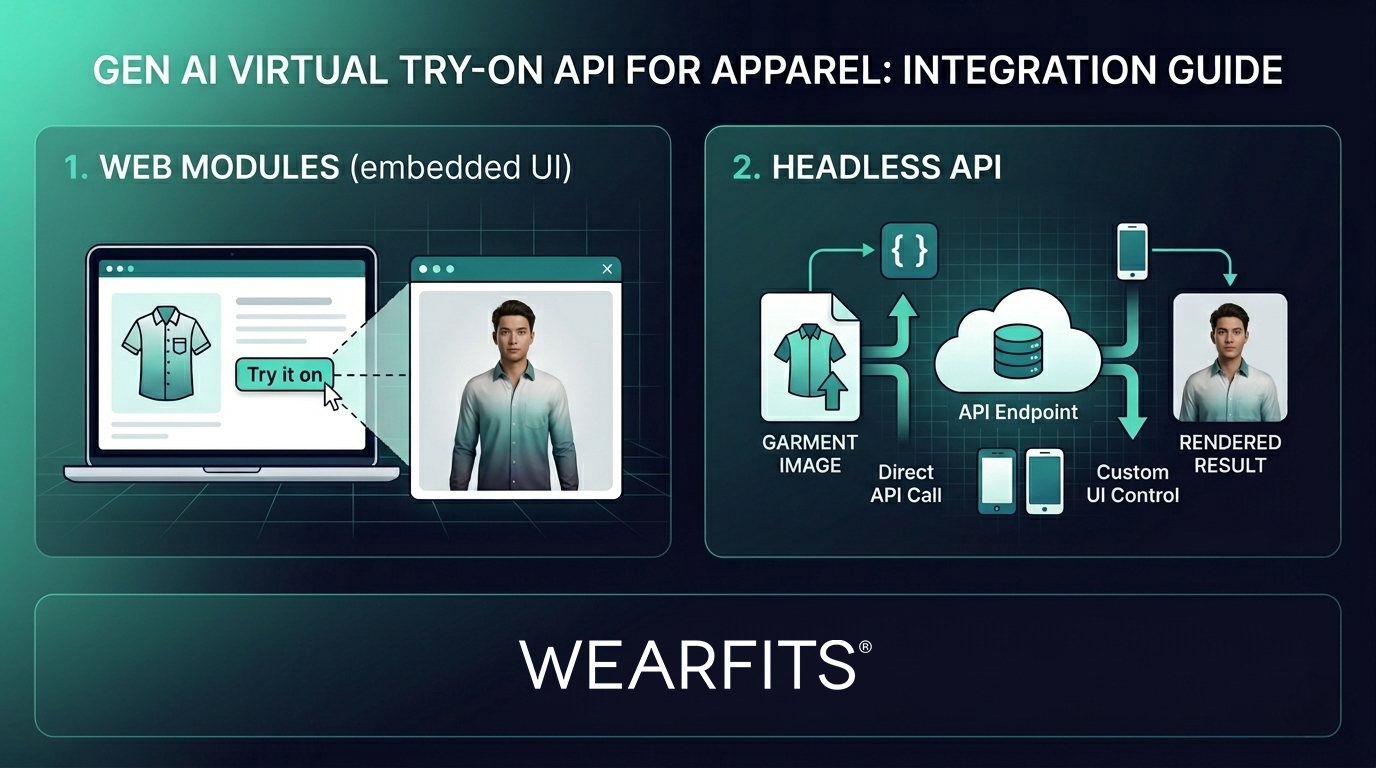
WEARFITS offers two distinct ways to add Gen AI clothing try-on to your product experience. They share the same underlying rendering engine, the same garment structure preservation pipeline, and the same digital twin infrastructure. They differ in how much of the UI you own and how much control your team takes over the end-user experience.
1. Web Modules (embedded UI). You embed the WEARFITS try-on experience directly into your site via iframe or JavaScript modal. The UI, the digital twin creation flow, the garment rendering — it all runs inside a component you load from tryon.wearfits.com. Your team manages the product data feed and the trigger (a "Try it on" button on your PDP, for example). WEARFITS handles everything else. The web modules integration docs cover setup in detail.
2. Headless API. You call the WEARFITS API directly. Send garment images, receive rendered try-on results. No WEARFITS UI — you build everything from upload flow to result display. Full control over the experience. This is the path for teams with design systems, custom frontends, or native mobile apps. The API reference documents every endpoint.
This is not a maturity ladder. One path is not "better" than the other. They serve different integration contexts, different team compositions, and different timelines. Understanding the trade-offs upfront saves weeks of rework.
This path is for teams that want to ship fast without building a try-on UI from scratch. You get a production-ready interface — avatar creation, garment selection, rendered output — wrapped in a component you can drop onto any page. It is the fastest way to go from "we should add try-on" to "try-on is live on our PDP." Integration typically takes one to two developer-days.
There are two embedding options. The first is iframe-based: load tryon.wearfits.com in an iframe on your product detail page and communicate with it via postMessage. The second is a JavaScript modal: import a script tag, configure it with your product data and event callbacks, and call a function to open the try-on experience as an overlay.
Both options support URL parameters for customisation. You can pass product catalogs as a JSON payload, skip the avatar upload step with step=fitting for returning users, or pre-load an existing digital twin with avatarId. The component fires a series of events your code can listen for: WEARFITS_READY when the module has loaded, WEARFITS_COMPLETE with the result image URL when a try-on finishes, WEARFITS_ERROR if something fails, and WEARFITS_CLOSE when the user dismisses the modal. These events give your frontend enough control to orchestrate the user experience — trigger analytics, update the UI, or store results — without managing the try-on pipeline itself.
The product feed is a JSON array. Each item includes an id, name, category (one of top, bottom, fullBody, or shoes), and an images array where images[0] is the lifestyle view and images[1] is the packshot. That is the entire schema. If your product catalog already has structured image data, this mapping takes minutes.
That is it. No ML infrastructure. No rendering pipeline. No avatar management. The integration documentation walks through each step with code samples.
Best for: Shopify and WooCommerce stores, teams without dedicated frontend engineering bandwidth, and brands wanting to test Gen AI clothing try-on before investing in a custom build. You can try the playground to see what your customers will experience.
This path is for teams that need the try-on capability but want to own every pixel of the experience. You call the WEARFITS API, get rendered results, and present them however you choose. There is no WEARFITS branding, no imposed layout, no constraints on how results appear. Your design team owns the experience end to end.
The WEARFITS API is RESTful and lives at api.wearfits.com. Authentication uses an X-API-Key header — no OAuth flows, no session tokens. You send garment images (topGarment, bottomGarment, fullBodyGarment, shoes) — each accepts a URL or base64 string, and you can send a single image or an array of two. The full pipeline runs as follows: face and body input creates a digital twin, then garment images are rendered onto that twin. Digital twins are cached for 30 days, so returning users do not recreate every session.
Processing is asynchronous. You submit a job, receive a job ID, and get notified via webhook when the result is ready. Webhooks are HMAC-SHA256 signed so you can verify authenticity. Standard rate-limit headers (X-RateLimit-Limit, X-RateLimit-Remaining, X-RateLimit-Reset) let your integration handle throttling gracefully.
Best for: Brands with custom frontends or headless commerce stacks, mobile app teams building in React Native, Swift, or Kotlin, agencies building white-label try-on experiences, and enterprise retailers needing complete UX control. Explore the full API documentation to see what is available.
Choose web modules when you want try-on live in days, not weeks. When your team is small or does not have dedicated frontend engineering bandwidth. When you are running Shopify, WooCommerce, or a template-based storefront. When you want to validate demand and measure conversion impact before committing engineering time to a custom build. The embedded approach lets you prove the business case first.
Choose the headless API when you have a custom frontend or headless commerce setup. When your design system requires pixel-level control over every interaction. When you are building a native mobile app in Swift, Kotlin, or React Native. When you need to integrate try-on into an existing product flow — inline on the PDP, not a separate modal. When your brand guidelines demand a seamless, fully on-brand experience from start to finish.
Start with web modules, migrate to API later. Many teams start with the embedded approach to test demand and measure conversion impact, then switch to the headless API once they have proven the business case and have engineering cycles to invest. The product data format is the same. The underlying Gen AI clothing try-on engine is the same. You are not rebuilding — you are taking more control. The migration path is straightforward because the API that powers the web modules is the same API you call directly. Your product data, your digital twins, your garment catalog — all of it carries over.
Garment-level accuracy, not demo-quality renders. Most clothing try-on APIs produce impressive single-image demos. Production means consistent quality across 5,000 SKUs — structured blazers, silk blouses, knitwear, outerwear, layered looks. The WEARFITS engine preserves garment structure across all categories. Collar shapes stay defined. Lapels hold their line. Button plackets do not blur into the fabric. This is the difference between a demo that wins a meeting and an engine that survives a full catalog rollout.
Person identity consistency. The same customer should look like themselves across 20 outfit changes. Generic diffusion models drift — faces shift subtly, skin tones adjust, body proportions change between renders. WEARFITS maintains face, skin tone, and body proportions throughout every try-on in a session and across sessions. This is not a nice-to-have. If the person in the try-on result does not look like the person who uploaded the photo, the core promise of personalised try-on breaks down.
Fabric-aware rendering. Cotton behaves differently from silk. Knitwear behaves differently from woven fabric. Denim has weight and structure; chiffon floats and layers transparently. A production-ready engine distinguishes material properties, not just visual patterns. True-to-drape rendering means the customer sees how the garment actually falls on their body, not a flat texture mapped onto a silhouette. This distinction matters most for fashion brands where fabric drape and physics are central to the product experience.
Latency under real load. Ask any provider for their P95 latency under production traffic, not best-case single-request benchmarks. The difference between a demo and a production system is what happens when 500 concurrent users submit try-on requests at the same time. The WEARFITS apparel platform is built for throughput — consistent speed at catalog scale, not just fast on a quiet afternoon.
Webhook reliability and error handling. Production integrations need predictable failure modes. HMAC-signed webhooks, structured error codes, and job retry patterns matter as much as image quality. If your integration cannot reliably detect and recover from failures, you are building on sand. WEARFITS provides typed error responses, idempotent retry semantics, and webhook delivery guarantees that let your team build robust, self-healing integrations.
Four steps from evaluation to integration:
Book a 20-minute integration walkthrough → wearfits.com/contact
Check pricing or explore the API documentation.